
I was sitting in a group meeting last week when Linda, who runs operations for a handyman company, mentioned she uses Smith AI, an answering service for contractors, to answer their phones. She totally gets that using a virtual receptionist for service businesses can really help her business.
“How much does that run you?” I asked.
“About $10 per call,” she said.
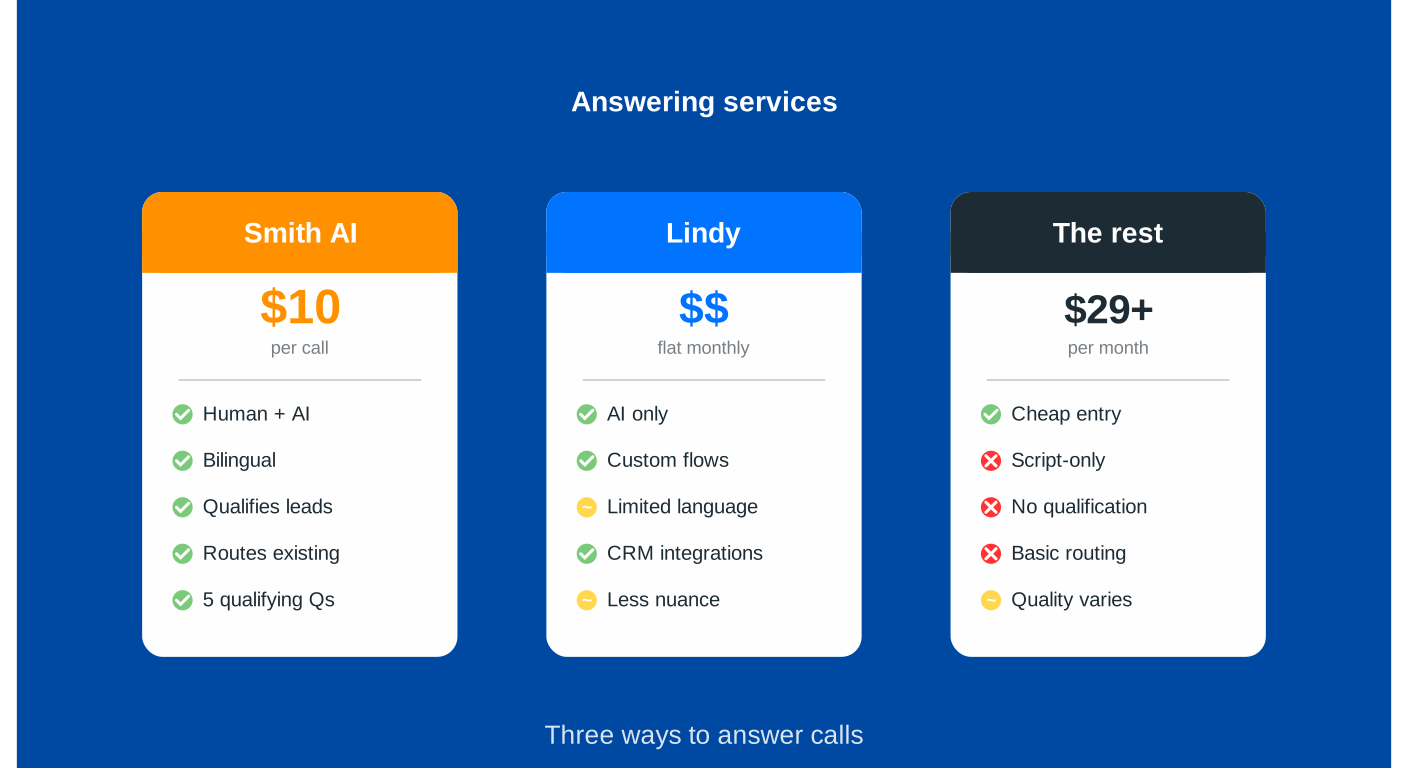
I blinked. That was more than I expected. But then she explained what she gets for that $10: a real human who speaks Spanish when needed, asks five qualifying questions, disqualifies leads outside their service area, and routes existing clients directly to their salesperson.
Oh. Well, that’s different than a chatbot reading a script.
This is the problem with “answering services” in 2026 – the term now covers everything from $29/month AI-only solutions to $500+/month hybrid human-AI services. They’re all solving the same problem (missed calls = lost revenue), but they solve it in dramatically different ways.
So let’s break down what you’re actually getting for your money.
The Landscape: Three Types of Services
Before we compare specific providers, understand that there are three fundamentally different approaches:
- Pure AI Services – Software answers every call, no humans involved. Cheapest option, handles unlimited calls simultaneously, works 24/7. Best for: high call volumes with routine questions.
- Human-Backed Services – Real people answer calls, possibly with AI assist for scheduling/routing. Most expensive, but handles complexity and emotion better. Best for: high-value calls where relationship matters.
- Hybrid Services – AI handles routine calls, escalates complex situations to humans. Middle ground on price and capability. Best for: businesses that want AI efficiency with a human safety net.
Now let’s look at specific options.
Smith AI: The Premium Human-Backed Option
What It Is: Live North American receptionists answer your calls, with AI helping behind the scenes for things like spam filtering and CRM integration.
Pricing:
- Virtual Receptionist plans: Start around $292/month
- Per-call pricing (actual price varies by plan)
- AI Receptionist plans: Start at $95/month (AI-first with human backup)
- Linda’s $10/call figure was accurate for her specific plan
What You Get:
- Actual humans who can think, adapt, and handle unexpected situations
- Bilingual support (English/Spanish) included
- Real-time CRM integration (HubSpot, Zoho CRM, Salesforce, Clio, and 5,000+ others)
- Lead qualification with custom screening questions
- Appointment scheduling
- Call recording and transcription
- Spam blocking (filters out junk before you’re charged)
- 24/7 availability
The Reality:
This is the most expensive option I’m reviewing, but you’re paying for human judgment. When a caller says “I think there’s a gas leak” vs. “I’d like to schedule a furnace cleaning,” a human knows which one needs immediate escalation. AI is getting better at this, but it’s not there yet.
The per-call model means your costs scale with usage – busy month = bigger bill. But Smith AI doesn’t charge you for spam calls or wrong numbers, which helps control costs.
Best For: Service businesses where trust and relationship-building matter (law firms, medical practices, high-end contractors), or companies that get complex, nuanced calls that require human judgment.
Lindy: The Flexible Automation Platform
What It Is: Lindy isn’t technically an “answering service” – it’s an AI automation platform that can handle phone calls as one of many capabilities.
Pricing:
- Free tier: 400 credits/month
- Pro plan: $49.99/month for ~5,000 tasks
- Voice calls: $0.19/minute (separate from base plan)
What You Get:
- AI agents that can handle calls AND follow up via email, update your CRM, send Slack notifications, etc.
- 7,000+ integrations (basically connects to everything)
- No-code setup – you describe what you want, it builds the workflow
- Multi-language support (30+ languages)
- Voice and text/chat capabilities in one platform
The Reality:
Lindy is powerful, but it’s not purpose-built for answering phones. Think of it as hiring a generalist assistant who can answer phones but also does your email, updates spreadsheets, and manages your calendar.
The credit system can be confusing to budget for – a 10-minute call might use 100 credits, a complex workflow might use 50 credits, and you won’t know until you’ve used it for a month. The voice quality is good (uses GPT-4o), but you’re building workflows yourself instead of getting an out-of-the-box receptionist.
Best For: Tech-comfortable businesses that want to automate multiple processes, not just phone answering. If you’re thinking “I need someone to answer calls AND automatically update my CRM AND send follow-up emails,” Lindy makes sense. If you just want phones answered, it’s probably overkill.
The Budget-Friendly AI-Only Options
If you don’t need human judgment and want predictable pricing, several pure-AI services have emerged that are significantly cheaper than the options above.
Rosie AI
- Pricing: $49/month (Professional plan) for unlimited call handling
- What You Get: AI-only, learns from your website/Google Business Profile, Zapier integration, customizable FAQs
- Best For: Solo operators or small teams with straightforward needs
Dialzara
- Pricing: $29/month (Starter) to $99/month (Pro)
- What You Get: 15-minute setup, natural voice quality, 24/7 availability, spam filtering
- Best For: Budget-conscious small businesses that need basic coverage fast
Goodcall
- Pricing: From $59/month for up to 100 unique callers
- What You Get: Lead capture, analytics dashboard, integrations with major tools
- Best For: Businesses that want data/analytics on their calls
The Reality of AI-Only:
These services are dramatically cheaper because there’s no human labor cost. You can handle 50 calls or 500 calls for the same flat monthly fee. The voice quality has improved significantly – many callers won’t realize they’re talking to AI.
But AI still struggles with:
- Highly emotional calls (angry customers, emergencies)
- Situations requiring judgment calls
- Complex multi-step problem solving
- Understanding heavy accents or unclear speech
For routine calls like “What are your hours?” or “I’d like to book an appointment,” AI works great. For “My basement is flooding and I think it’s coming from my neighbor’s unit and I need someone here NOW,” you might want a human.
The Hybrid Middle Ground: Best of Both Worlds?
Smith AI’s AI Receptionist (different from their Virtual Receptionist)
- Pricing: Starting at $95/month
- What You Get: AI handles most calls, live agents available for escalations
- The Pitch: 90% cost savings of AI, 10% human safety net when needed
This is probably the sweet spot for many businesses. You get the efficiency and cost-effectiveness of AI for routine calls, but complex situations automatically escalate to humans. You’re not paying $10/call for simple “What time do you close?” questions, but you’re also not leaving angry customers talking to a robot.
The Integration Question Nobody Asks (But Should)
Here’s what Linda taught me: The answering service is only as good as its integration with your other tools.
If your answering service captures a lead but that information sits in their dashboard instead of automatically flowing to your CRM, you’re creating more work, not less. You’ll end up manually copying information from their system to yours, which defeats the entire purpose.
Strong Integration Ecosystems:
- Smith AI: 5,000+ integrations including native connections to HubSpot, Salesforce, Clio
- Lindy: 7,000+ via Pipedream Connect
- Most AI-Only Services: 1,000-8,000+ via Zapier
But here’s the catch with Zapier integrations: they’re one more thing to maintain. When the answering service updates their API, your Zap can break. When your CRM changes a field name, your Zap stops working.
Native integrations tend to be more reliable because they’re maintained by the platforms themselves. If you’re already using HubSpot or another CRM and considering answering services, Smith AI’s native integration is worth the premium over cheaper services using Zapier as a middleman.
What This Actually Costs You (The Real Math)
Let’s run some realistic scenarios to see where each option makes sense.
Scenario 1: Low-Volume Solo Business (50 calls/month, mostly simple questions)
- Smith AI Virtual Receptionist: ~$300-400/month (per-call pricing)
- Lindy: ~$50-100/month ($50 base + minimal voice minutes)
- AI-Only (Rosie/Dialzara): $29-49/month flat
Winner: AI-only services save you $250+/month for routine calls.
Scenario 2: Medium-Volume Service Business (200 calls/month, mix of complexity)
- Smith AI: ~$600-800/month
- Smith AI Hybrid: ~$200-300/month
- Lindy: ~$150-200/month
- AI-Only: $49-99/month
Winner: Hybrid approach (Smith AI Receptionist or Lindy) gives you flexibility without breaking the bank.
Scenario 3: High-Volume Business (500+ calls/month, complex qualification needed)
- Smith AI Virtual Receptionist: $1,500+/month
- Smith AI Hybrid: $300-500/month
- Lindy: $300-400/month
- AI-Only: $49-99/month (same flat rate!)
Winner: This is where AI-only really shines – your costs don’t scale with volume. But only if your calls are routine enough for AI to handle.
The Hidden Costs Nobody Mentions
Setup Time:
- Smith AI: White-glove onboarding, they do the work
- Lindy: You’re building workflows yourself (could take hours)
- AI-Only Services: Usually 15-30 minutes
Training/Maintenance:
- Human services: They handle updates
- AI services: You’ll need to update FAQs, train on new services, adjust scripts as your business changes
Missed Nuance:
This is the cost you can’t easily measure. How much revenue do you lose when AI mishandles a high-value call? Or when a frustrated customer hangs up because the bot didn’t understand them?
For a plumber, a missed emergency call at 2 AM might be worth $3,000. For a lawyer, a mishandled intake might be worth $50,000. The “cheap” answering service suddenly doesn’t look so cheap if it fumbles one of those.
My Honest Recommendation
There’s no universal “best” option. It depends entirely on your business.
Go with Smith AI (full human service) if:
- Your average call value is $500+
- You handle sensitive/emotional situations (legal, medical, crisis services)
- Trust and relationship-building are core to your business
- You can’t afford to fumble complex calls
Go with a hybrid service (Smith AI Receptionist or Lindy) if:
- You get a mix of routine and complex calls
- You want cost efficiency but need a human backup plan
- Your call volume is unpredictable (busy seasons)
Go with AI-only if:
- Your calls are mostly routine (hours, pricing, basic booking)
- You’re handling high volume and need predictable costs
- You’re comfortable with 90% good, 10% “the bot couldn’t help them”
- You’re a solo operator watching every dollar
Don’t use any of them if:
- You get fewer than 20 calls per month (just use voicemail)
- Your business requires deep technical expertise to answer questions
- Every call is completely unique and unpredictable
The Bottom Line
Linda’s $10/call with Smith AI isn’t expensive when you realize a single new HVAC job is worth $5,000+ and they’re closing leads they used to miss. Context matters.
The cheapest option isn’t always the best value, and the most expensive option isn’t always better. Figure out what your missed calls are costing you, what kind of calls you’re getting, and how much complexity they involve.
Then pick the service that matches that reality – not the one with the flashiest website or the lowest price tag.
Want help figuring out which answering service (or automation system) makes sense for your business? Book a discovery call and we’ll look at your actual call patterns, integration needs, and business model to find the right fit.