
When a homeowner calls at 6:40 on a Friday and gets your voicemail, they call the next guy. An AI assistant answers the phone, the text, and the web form in under a minute, any hour, and books the appointment straight onto your calendar. Not an answering service that takes a message. It gets the job on the books.
You know the feeling. You’re up on a ladder, under a sink, or three questions deep with a client, and your phone starts buzzing. You can’t answer. So the call rolls to voicemail, or worse, to nobody. Later you’ll dig out from it, if you remember.
That is the real problem: the whole operation waits on you. Every call, every quote, every “can you just call me back” lands on the one person who’s already stretched too thin. An answering service takes your business off your own shoulders so a ringing phone stops deciding how your day goes. Below, two of the better options, Smith AI and Lindy, and how to tell which one actually fits how you work.
A quick story on why the right fit matters. I was in a group meeting last week when Linda, who runs operations for a handyman company, mentioned she uses Smith AI to answer their phones.
“How much does that run you?” I asked.
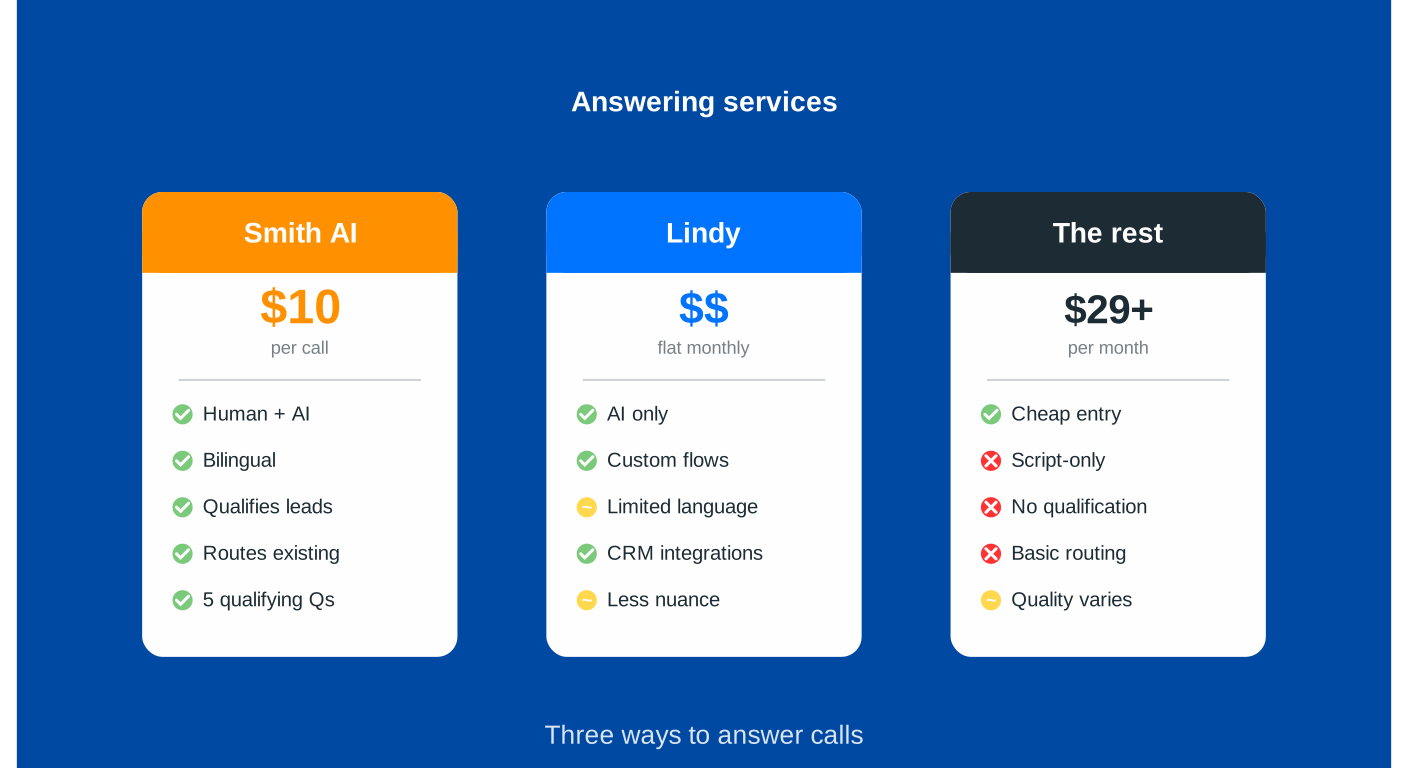
“About $10 per call,” she said.
I blinked. That was more than I expected. But then she explained what she gets for that $10: a real human who speaks Spanish when needed, asks five qualifying questions, disqualifies leads outside their service area, and routes existing clients directly to their salesperson.
Oh. Well, that’s different than a chatbot reading a script.
This is the problem with “answering services” in 2026. The term now covers everything from $29/month AI-only tools to $500+/month hybrid human-AI services. They all solve the same problem, a phone that only rings for you, but they solve it in very different ways.
So let’s break down what you’re actually getting for your money.
The Landscape: Three Types of Services
Before we compare specific providers, understand that there are three fundamentally different approaches:
- Pure AI Services. Software answers every call, no humans involved. Cheapest option, handles unlimited calls at once, works 24/7. Best for high call volumes with routine questions.
- Human-Backed Services. Real people answer calls, sometimes with AI assist for scheduling and routing. Most expensive, but handles complexity and emotion better. Best for high-value calls where the relationship matters.
- Hybrid Services. AI handles routine calls and escalates complex situations to humans. Middle ground on price and capability. Best for businesses that want AI efficiency with a human safety net.
Now let’s look at specific options.
Smith AI: The Premium Human-Backed Option
What it is: Live North American receptionists answer your calls, with AI helping behind the scenes for things like spam filtering and CRM integration.
Pricing:
- Virtual Receptionist plans: start around $292/month
- Per-call pricing (actual price varies by plan)
- AI Receptionist plans: start at $95/month (AI-first with human backup)
- Linda’s $10/call figure was accurate for her specific plan
What you get:
- Actual humans who can think, adapt, and handle the unexpected
- Bilingual support (English/Spanish) included
- Real-time CRM integration (HubSpot, Zoho CRM, Salesforce, and 5,000+ others)
- Lead qualification with custom screening questions
- Appointment scheduling
- Call recording and transcription
- Spam blocking (filters out junk before you’re charged)
- 24/7 availability
The reality: This is the most expensive option here, but you’re paying for human judgment. When a caller says “I think there’s a gas leak” versus “I’d like to schedule a furnace cleaning,” a human knows which one needs immediate escalation. AI is getting better at this, but it’s not there yet. The per-call model means your costs scale with usage, so a busy month means a bigger bill. Smith AI doesn’t charge you for spam calls or wrong numbers, which helps keep it in check.
Best for: Service businesses where trust and relationship-building matter (bookkeeping and accounting practices, design and consulting firms, high-end contractors), or anyone who gets complex, nuanced calls that need human judgment.
Lindy: The Flexible Automation Platform
What it is: Lindy isn’t strictly an “answering service.” It’s an AI automation platform that can handle phone calls as one of many capabilities.
Pricing:
- Free tier: 400 credits/month
- Pro plan: $49.99/month for about 5,000 tasks
- Voice calls: $0.19/minute (separate from the base plan)
What you get:
- AI agents that can handle calls and follow up by email, update your CRM, send Slack notifications, and more
- 7,000+ integrations (connects to nearly everything)
- No-code setup: you describe what you want and it builds the workflow
- Multi-language support (30+ languages)
- Voice and text/chat in one platform
The reality: Lindy is powerful, but it’s not purpose-built for answering phones. Think of it as a generalist assistant who can answer calls but also does your email, updates spreadsheets, and manages your calendar. The credit system can be hard to budget for. A 10-minute call might use 100 credits, a complex workflow might use 50, and you won’t know until you’ve run it for a month. Voice quality is good, but you’re building the workflows yourself instead of getting an out-of-the-box receptionist.
Best for: Tech-comfortable businesses that want to automate multiple processes, not just phone answering. If you’re thinking “I need someone to answer calls and update my CRM and send follow-up emails,” Lindy makes sense. If you just want the phone answered, it’s probably overkill.
The Budget-Friendly AI-Only Options
If you don’t need human judgment and want predictable pricing, several pure-AI services are much cheaper than the options above.
Rosie AI
- Pricing: $49/month (Professional plan) for unlimited call handling
- What you get: AI-only, learns from your website and Google Business Profile, Zapier integration, customizable FAQs
- Best for: solo operators or small teams with straightforward needs
Dialzara
- Pricing: $29/month (Starter) to $99/month (Pro)
- What you get: 15-minute setup, natural voice quality, 24/7 availability, spam filtering
- Best for: budget-conscious small businesses that need basic coverage fast
Goodcall
- Pricing: from $59/month for up to 100 unique callers
- What you get: lead capture, analytics dashboard, integrations with major tools
- Best for: businesses that want data and analytics on their calls
The reality of AI-only: These services are much cheaper because there’s no human labor cost. You can handle 50 calls or 500 for the same flat monthly fee, and voice quality has improved to the point that many callers won’t realize they’re talking to AI. But AI still struggles with highly emotional calls, judgment calls, complex multi-step problems, and heavy accents or unclear speech. For “what are your hours?” or “I’d like to book an appointment,” AI works great. For “my basement is flooding and I need someone here NOW,” you may want a human.
The Hybrid Middle Ground
Smith AI’s AI Receptionist (different from their Virtual Receptionist)
- Pricing: starting at $95/month
- What you get: AI handles most calls, live agents available for escalations
- The pitch: most of the cost savings of AI, with a human safety net when needed
This is the sweet spot for a lot of businesses. You get the efficiency and low cost of AI for routine calls, but complex situations automatically escalate to a person. You’re not paying $10 a call for “what time do you close?” and you’re not leaving a frustrated customer talking to a robot.
The Integration Question Nobody Asks (But Should)
Here’s what Linda taught me: the answering service is only as good as its integration with your other tools.
If your service captures a lead but that information sits in their dashboard instead of flowing into your CRM automatically, you’re creating more work, not less. You’ll end up hand-copying details from their system into yours, which defeats the whole purpose.
Strong integration ecosystems:
- Smith AI: 5,000+ integrations, including native connections to HubSpot, Salesforce, and Clio
- Lindy: 7,000+ via Pipedream Connect
- Most AI-only services: 1,000-8,000+ via Zapier
One catch with Zapier connections: they’re one more thing to maintain. When the answering service updates its API, your Zap can break. When your CRM renames a field, your Zap stops working. Native integrations tend to be more reliable because the platforms maintain them. If you’re already on HubSpot or another CRM, Smith AI’s native integration is worth the premium over cheaper services leaning on Zapier as a middleman.
What This Actually Costs You (The Real Math)
Let’s run some realistic scenarios.
Scenario 1: Low-volume solo business (50 calls/month, mostly simple questions)
- Smith AI Virtual Receptionist: about $300-400/month (per-call pricing)
- Lindy: about $50-100/month ($50 base plus minimal voice minutes)
- AI-only (Rosie/Dialzara): $29-49/month flat
Winner: AI-only services save you $250+ a month for routine calls.
Scenario 2: Medium-volume service business (200 calls/month, mixed complexity)
- Smith AI: about $600-800/month
- Smith AI Hybrid: about $200-300/month
- Lindy: about $150-200/month
- AI-only: $49-99/month
Winner: a hybrid approach gives you flexibility without breaking the bank.
Scenario 3: High-volume business (500+ calls/month, complex qualification needed)
- Smith AI Virtual Receptionist: $1,500+/month
- Smith AI Hybrid: $300-500/month
- Lindy: $300-400/month
- AI-only: $49-99/month (same flat rate)
Winner: this is where AI-only really shines, because your costs don’t scale with volume, but only if your calls are routine enough for AI to handle.
The Hidden Costs Nobody Mentions
Setup time:
- Smith AI: white-glove onboarding, they do the work
- Lindy: you’re building workflows yourself, which can take hours
- AI-only services: usually 15-30 minutes
Training and maintenance:
- Human services handle updates for you
- AI services need you to update FAQs, train on new services, and adjust scripts as your business changes
Missed nuance: This is the cost you can’t easily measure. How much revenue do you lose when AI mishandles a high-value call, or when a frustrated customer hangs up because the bot didn’t understand them? For a plumber, a missed emergency call at 2am might be worth $3,000. For a design or consulting firm, a mishandled first call might be worth $50,000. The “cheap” answering service suddenly doesn’t look so cheap if it fumbles one of those.
My Honest Recommendation
There’s no universal “best” option. It depends on your business.
Go with Smith AI (full human service) if:
- Your average call value is $500+
- You handle high-stakes, sensitive calls where a wrong answer is costly
- Trust and relationship-building are core to your business
- You can’t afford to fumble complex calls
Go with a hybrid service (Smith AI Receptionist or Lindy) if:
- You get a mix of routine and complex calls
- You want cost efficiency but need a human backup
- Your call volume is unpredictable across seasons
Go with AI-only if:
- Your calls are mostly routine (hours, pricing, basic booking)
- You’re handling high volume and need predictable costs
- You’re comfortable with “90% good, 10% the bot couldn’t help them”
- You’re a solo operator watching every dollar
Don’t use any of them if:
- You get fewer than 20 calls a month (just use voicemail)
- Your business needs deep technical expertise to answer questions
- Every call is completely unique and unpredictable
The Bottom Line
Linda’s $10/call with Smith AI isn’t expensive once you realize a single new job is worth thousands and she’s closing leads she used to miss. Context matters. The cheapest option isn’t always the best value, and the most expensive isn’t always better. Figure out what your missed calls are costing you, what kind of calls you get, and how much complexity they involve. Then pick the service that matches that reality, not the one with the flashiest website or the lowest price.
Whichever you choose, the point is the same: the phone stops being one more thing that only works when you’re free to answer it.
Want help figuring out which answering service or automation setup makes sense for your business? Book a Discovery Call and we’ll look at your actual call patterns, integration needs, and business model to find the fit that gets the phone off your plate.