
Timing beats effort on reviews, and it is not close. The moment to ask is while they are still looking at the thing you built.
The reason people do not ask then is that finding the review link takes four minutes and you are in a truck. So set the link up once, on a computer, and turn it into two letters on your phone.
Why timing beats effort
They are standing in a fixed kitchen looking at your work. A week later, the same ask arrives cold and reads as a favor you are asking. Same customer, same job, completely different answer rate.
Do this
Step one, on a computer, once
Sign in to the Google account that owns your business listing and go to business.google.com.
Read reviews → Get more reviews → Copy.
That gives you a short review link. It was formerly called “Ask for reviews.”
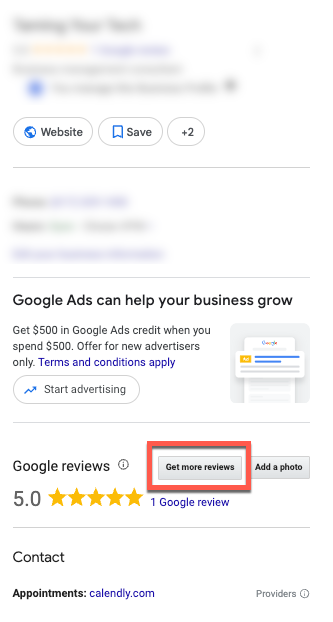
Do this on a computer. It is the reliable way, and if you also want the review QR code, a computer is the only way — Google does not let you generate the QR code from a phone.
Step two, make it two letters
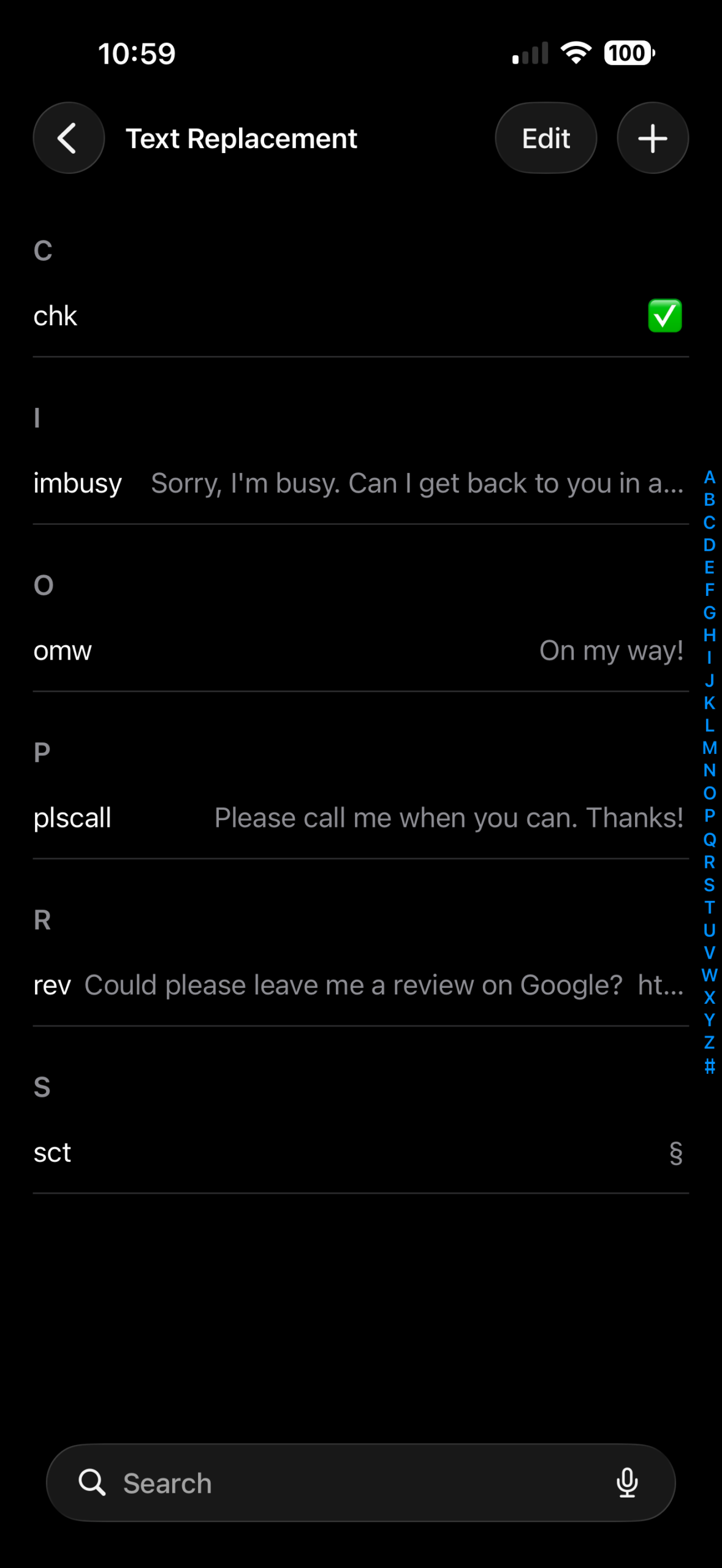
iPhone: Settings → General → Keyboard → Text Replacement → tap the Add button (top right). Put your message and the link in Phrase, and put rev in Shortcut.
Android, Gboard: open any text field → tap the gear on the keyboard toolbar → Dictionary → Personal dictionary → your language → +. Full phrase in the top field, rev in the Shortcut field.
Android, Samsung Keyboard: Settings → General management → Samsung Keyboard settings → Text shortcuts → +. On some devices there is one more step: Settings → General management → Samsung Keyboard settings → More typing options → Text shortcuts → +. Samsung documents it both ways and it varies by device, so if you do not see Text shortcuts on the first screen, look under More typing options. Put rev in Shortcut phrase and your message in Expanded phrase.
A message that gets answered:
Really enjoyed working on your place. If you have 30 seconds, a Google review helps a small shop like mine more than you would think. [link]
Step three, from the truck
Text the customer and type rev. Send.
On all three, the full phrase comes up as a suggestion above the keyboard and you tap it to drop it in.
Two things not to do
Google’s rules changed and they are enforced. Do not pressure a customer on the premises, do not offer a discount or anything else in exchange for a review, and do not ask a customer to name a specific crew member. Do not set review quotas for your crew either. Any of those can get your reviews pulled. Asking plainly, once, is fine.
What is allowed: a plain QR code or a sign at your shop or on the truck, sitting there for anyone who wants it. A neutral invitation is fine. It is the pressure and the trade that are not.
If your screen looks different
Google rearranges the business listing pages often, and this button has had two names in two years. The steps here were checked on 2026-09-07. If you do not see Get more reviews, open Read reviews first and look there, and do it on a computer — the phone view hides some of it.
On the keyboard side, the shortcut setting is filed under a different name on some phones. Search your phone’s Settings for “text replacement,” “shortcut,” or “dictionary” and you will land on it.
Either way, send me a photo of the screen you are stuck on and I will tell you where it moved.
Next
- One shared photo album per job — Before-and-after photos are what makes a good review specific.
- Get work email off your personal address — The review link and the listing live behind the same Google account as your business email.
Want more than a tip?
I am Betsy Walker. I do the work a busy owner never gets to: the website, the follow-up, the customer email, the reviews, the online listings. Nobody in your business was ever hired to do any of it, so it waits for you.
One piece at a time, done in a week or two at a price you know before I start, most of them between $550 and $850. Or I run it every month, so it stays done. I work remotely, so nobody has to show up at your shop.
Book a free discovery call · 15 minutes. No pitch. Just where to start.