
A ten-minute warning is useless when the job is thirty-five minutes away. And a single alert that goes off while you are running a saw never happened.
Two alerts, set once, applied to everything you book from here on.
Do this
On a computer
- Go to calendar.google.com and click the gear icon → Settings.
- In the left sidebar under Settings for my calendars, click your calendar name, then click Calendar settings.
- Find Event notifications.
- Set the first one to 1 hour before. Click Add notification and set the second to 15 minutes before.
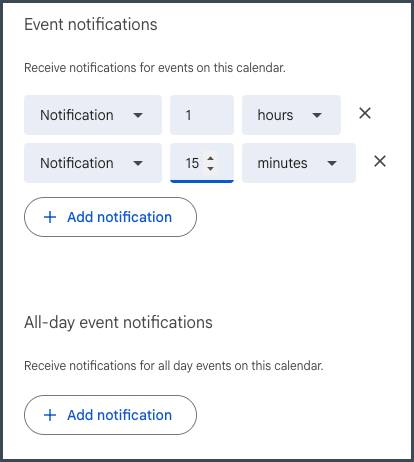
On a computer — Event notifications, set to 1 hour and 15 minutes
The first one gets you moving. The second catches you if you missed the first.
Set it here, not on one event. This is the default, so everything you book from now on inherits it and you never think about it again. Changing it on a single event only fixes that event.
Pick your two numbers honestly
An hour is the right first number for most trades, because it is roughly the point where you can still change what you are doing. If your jobs run further out, make it two hours. The second alert should be about the time it takes you to pack up and get in the truck, not a round number.
While you are in there
There is a separate section right below called All-day event notifications, which is what fires for anything without a specific time. Worth setting the same way if you use all-day events for material deliveries.
One thing to know
If your notifications are turned off at the top level, none of this fires. That is under Settings → General → Notification settings, and the Notifications dropdown needs to be on something other than Off. It is the most common reason someone sets all this up and hears nothing.
If your screen looks different
Google reorganizes the Calendar settings page every so often. These steps were checked on 2026-09-07.
If you cannot find Event notifications, check that you clicked your own calendar’s name in the left sidebar first. The general Settings page and your calendar’s own settings look almost the same, and only one of them holds the defaults. Do this on a computer — the phone app does not offer the same defaults.
If your sidebar does not look like this at all, send me a photo and I will point you at the right row.
Next
- Put the estimate on the calendar before you hang up — Reminders only fire for appointments that made it onto the calendar.
- Stop trading six texts to book one estimate — Fewer appointments get lost when the customer books the slot themselves.
Want more than a tip?
I am Betsy Walker. I do the work a busy owner never gets to: the website, the follow-up, the customer email, the reviews, the online listings. Nobody in your business was ever hired to do any of it, so it waits for you.
One piece at a time, done in a week or two at a price you know before I start, most of them between $550 and $850. Or I run it every month, so it stays done. I work remotely, so nobody has to show up at your shop.
Book a free discovery call · 15 minutes. No pitch. Just where to start.