
“Tuesday?” “Can’t Tuesday.” “Thursday morning?” “How early?” Six messages to book one walkthrough, times nine walkthroughs a week.
The fix is a link that shows only the times you are willing to do estimates.
Why it protects your day
The back-and-forth disappears. More than that, estimates start landing in the hours you picked instead of the hours the customer picked, which is the difference between a Tuesday with two estimates at either end of the county and a Tuesday with two estimates back to back at 7am.
Do this
On a computer
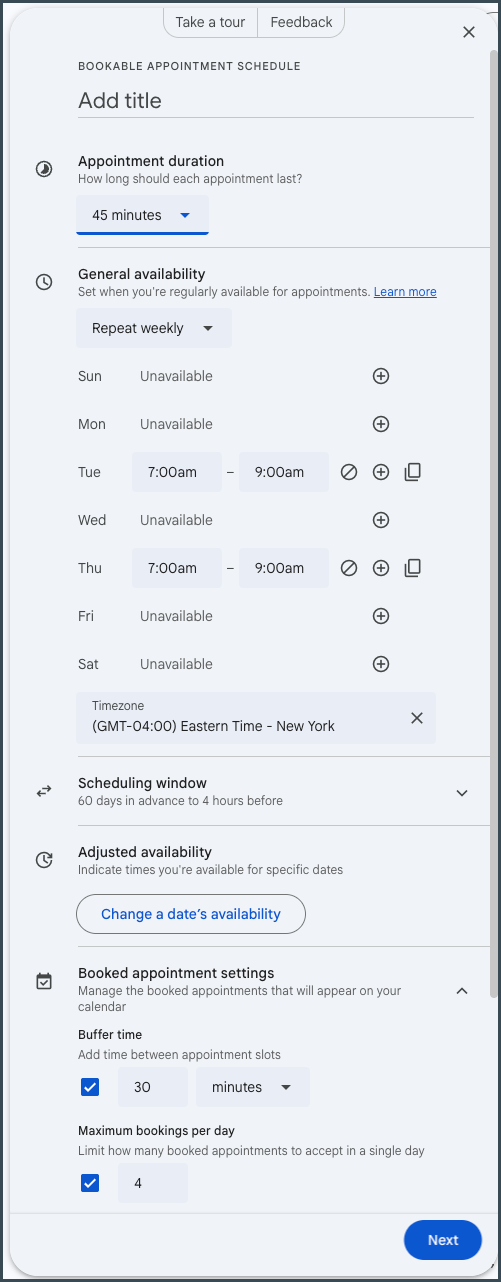
- Go to calendar.google.com and click Create → Appointment schedule.
- Name it and set the Appointment duration. For estimates, 45 minutes is usually right once you include drive time.
- Under General availability, open only the windows you actually want. Tuesday and Thursday, 7 to 9am, is a real answer. So is one afternoon a week.
- Set Buffer time between appointments and a Maximum bookings per day, so a good week cannot eat itself.
- Save, then copy the link from Booking pages in the sidebar.
- Put the link in your email signature.
Save the link as a text shortcut too, so you can send it from the truck without hunting for it. On an iPhone: Settings → General → Keyboard → Text Replacement → tap the Add button, put the link in Phrase and book in Shortcut. On Android it is the same idea, under Gboard’s personal dictionary or Samsung Keyboard’s text shortcuts.
This works on a free personal Google account. You get one booking page, and paying for Google Workspace does not get you more — Business Starter caps it at one too. One is all you need for estimates.
You have to set this up on a computer. Google does not let you create a booking page from the phone app. Once it exists, sharing it from your phone is fine.
One warning
If Google auto-created a booking page for you from your working hours, check it before you send the link anywhere. It may be offering times you would never take.
If your screen looks different
Google has renamed and rebuilt appointment scheduling more than once, and the buttons move. These steps were checked on 2026-09-07.
If there is no Appointment schedule under Create, check that you are on calendar.google.com in a browser on a computer rather than in the phone app — the phone app cannot create one. If you are on a computer and still do not see it, click the gear icon and look for anything with “appointment” or “booking” in the name.
Still not finding it? Send me a photo of your Create menu and I will tell you where it went.
Next
- Put the estimate on the calendar before you hang up — A booked estimate still needs to be on the calendar you actually look at.
- Turn your missed calls into answered ones — For the calls that come in anyway, answer them in five seconds.
Want more than a tip?
I am Betsy Walker. I do the work a busy owner never gets to: the website, the follow-up, the customer email, the reviews, the online listings. Nobody in your business was ever hired to do any of it, so it waits for you.
One piece at a time, done in a week or two at a price you know before I start, most of them between $550 and $850. Or I run it every month, so it stays done. I work remotely, so nobody has to show up at your shop.
Book a free discovery call · 15 minutes. No pitch. Just where to start.