
You are on a ladder. The phone rings. You cannot take it. By the time you climb down, call back, and leave a message, the homeowner has already called two other guys and booked the one who picked up.
You cannot answer every call. You can answer every caller.
Why it wins work
They hear from you in five seconds, not five hours. And you gave them a time, which means they stop shopping. Most people will wait until 6pm for a plumber who told them 6pm. Almost nobody waits on silence.
Do this
iPhone
Write your reply first.
Settings → Apps → Phone → Respond with Text, then tap any of the three lines and replace it.
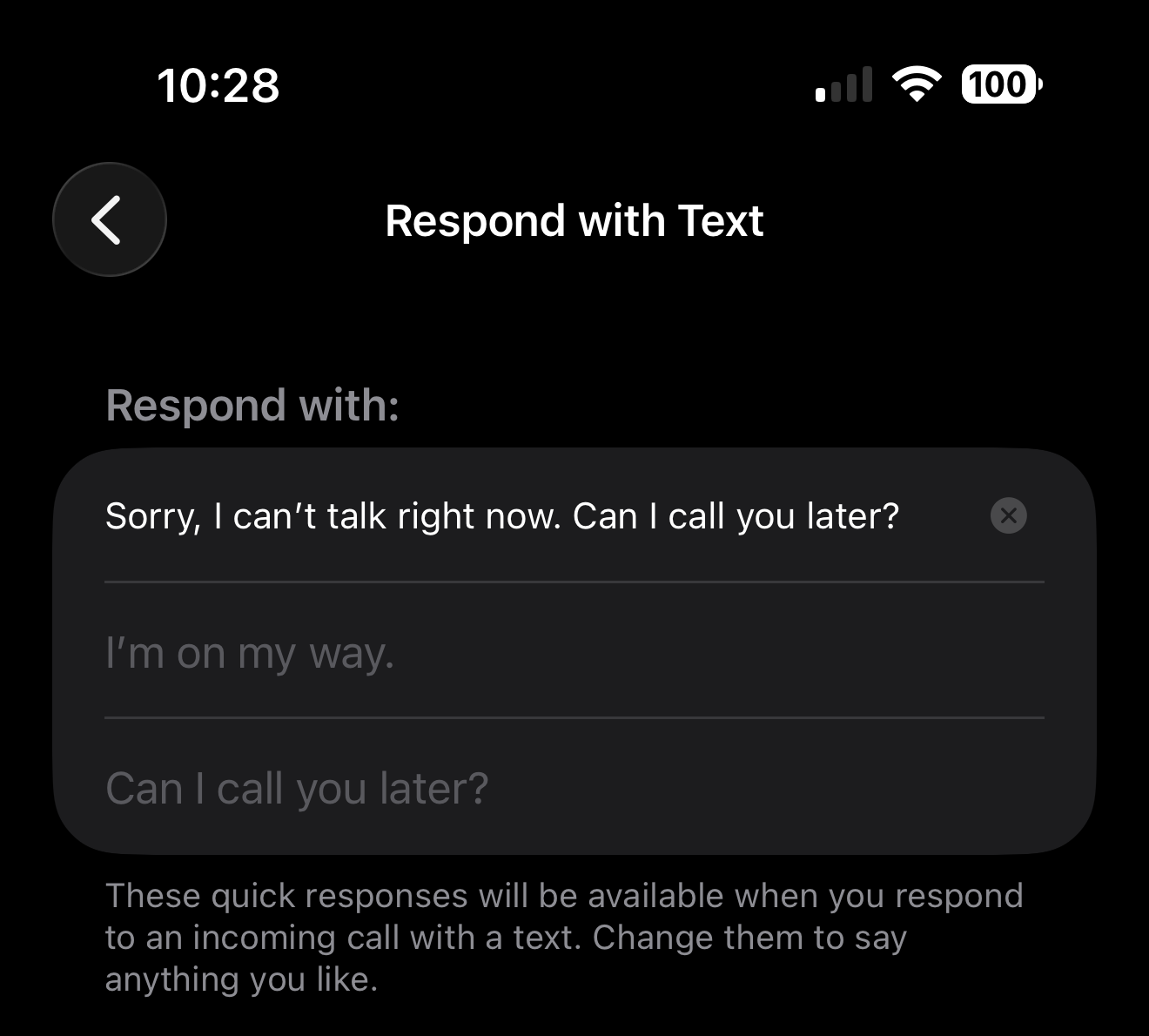
Write one that sounds like you and gives them a time:
On a job right now. I will call you back before 6. Mike, Mike’s Plumbing.
Then use it when a call comes in. Tap the call banner, tap Message, pick your reply.
One thing to get right: swiping up on the banner is how you decline a call and send it to voicemail. Pressing the side button twice does the same. Both are real controls, and neither one sends a text. If you want the caller to get your message, tap the banner instead of swiping it.
If Respond with Text is not under Apps, you are on an older iOS. Try Settings → Phone → Respond with Text.
Android, Google Phone app (Pixel and most non-Samsung phones)
Write your reply first.
Phone app → More (⋮) → Settings → Quick responses → tap a response → edit → Ok
Then use it when a call comes in. Tap the Message icon on the incoming call screen, then pick your reply, or “Write your own.”
Android, Samsung Galaxy
Samsung calls these something different.
Phone app → ⋮ → Settings → Quick decline messages → tap Write new message → type your message → tap + to add it.
To use it: swipe up on the incoming call screen, then tap the message you want to send. Note that this is the opposite of the iPhone gesture. On a Samsung, swiping up is how you get to the list.
Do not confuse this with Call assist. Newer Samsungs also offer incoming call → Call assist → Text call → tap a preset. That is a different feature, for holding a live typed conversation during the call. If you landed there, back out. The list you want is the one under Quick decline messages.
If your screen looks different
I walked these steps on iOS 26, Android 17, and Samsung One UI 8.5. If your phone is on older software, the setting is almost always still there, just parked under a different menu name.
Menu names drift between phone models and software versions, and Samsung renames things more than most. Search your phone’s Settings for “decline” or “quick response.” Still stuck? Send me a photo of the screen and I will tell you where it moved.
Next
- Stop trading six texts to book one estimate — Once you have texted them back, give them a link to pick a time instead of trading six more messages.
- Put the estimate on the calendar before you hang up — The call you did answer still has to reach the calendar.
Want more than a tip?
I am Betsy Walker. I do the work a busy owner never gets to: the website, the follow-up, the customer email, the reviews, the online listings. Nobody in your business was ever hired to do any of it, so it waits for you.
One piece at a time, done in a week or two at a price you know before I start, most of them between $550 and $850. Or I run it every month, so it stays done. I work remotely, so nobody has to show up at your shop.
Book a free discovery call · 15 minutes. No pitch. Just where to start.